The PatOS AI factory starts with an access path we can trust
How the first PatOS AI factory step established a human-controlled route into a live Lab VPS while keeping the SSH private key in Bitwarden.
Step one: put a human-controlled route into live Lab use while the SSH private key remains in Bitwarden rather than ~/.ssh.
An AI factory is only as dependable as the access path beneath it. Before we add models, agents, queues or deployment automation, we need to know who can reach the machines, which credentials they use, and how access can be recovered without quietly weakening the boundary.
For the first PatOS AI factory step, we implemented and put into live Lab use a controlled route into a disposable Ubuntu VPS. A dedicated human-administrator SSH identity is held in Bitwarden Password Manager; the cloud provider receives only its public half. Strict host-key checking catches a rebuilt server’s changed identity, and a fresh session verifies the intended Ubuntu account and non-interactive administrative elevation.
This is a field note about a proven, live PatOS Lab implementation, not a claim that the pattern is finished, universal or ready for production.
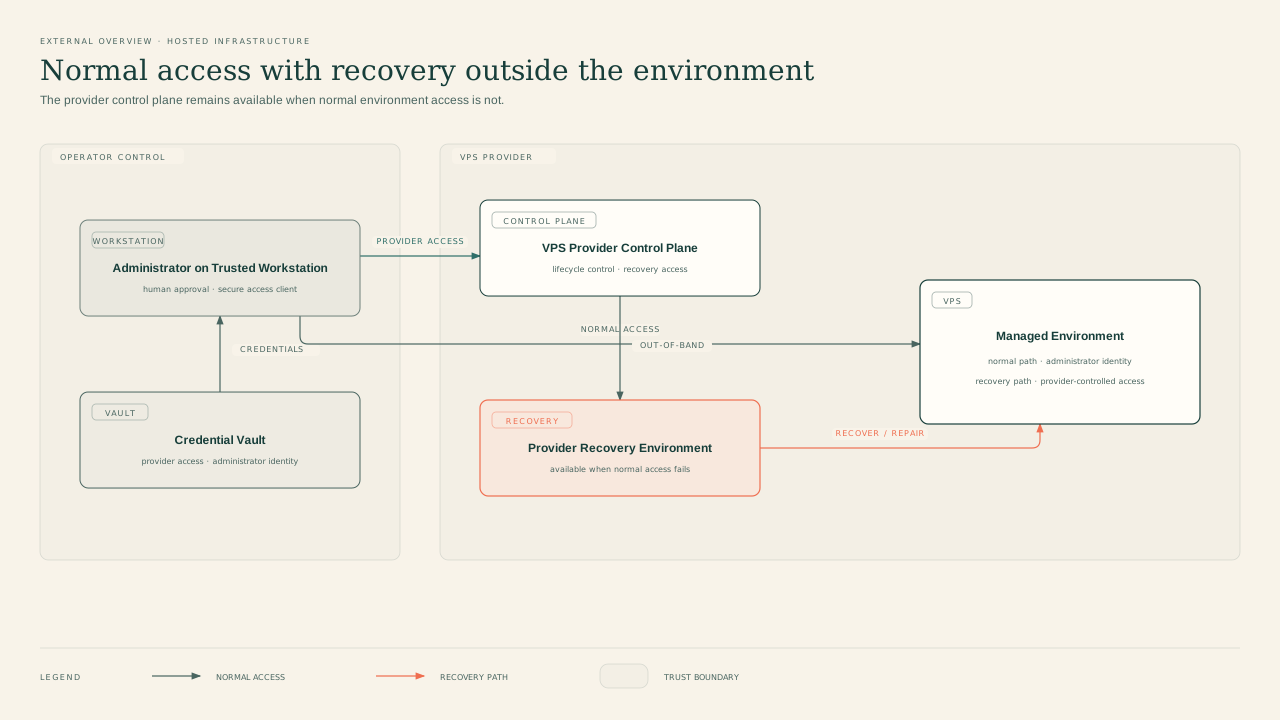
Diagram 1: normal administration and provider-controlled recovery remain separate paths across the hosting boundary.
The control plane comes before the workload
It is tempting to begin an AI platform with the visible machinery: GPUs, inference servers, agent runtimes and orchestration. We started one layer lower.
The first question was not “what should run on the VPS?” It was “how do we regain trusted administrative access after a rebuild?” That led to five design choices:
1. Give the Lab its own SSH identity instead of reusing an identity from another environment. 2. Keep the private key in Bitwarden Password Manager and let its desktop SSH agent perform signing. 3. Put only the public key into the cloud provider’s rebuild workflow. 4. Pin the rebuilt server’s host identity and fail closed when it changes. 5. Keep human access separate from future machine-to-machine secrets.
That separation matters. Bitwarden’s desktop app can expose a local SSH-agent socket, receive signing requests from tools such as ssh, and use keys stored in the vault rather than relying on a private-key file on the local filesystem. Bitwarden also documents a practical limitation: the agent does not offer per-request key selection, so a public IdentityFile selector can be useful when several keys are present. See Bitwarden’s SSH overview and SSH Agent setup guide.
The result is a narrow trust path. The configured workstation requests a signature from an unlocked, authorised vault. The server validates that signature against the public key it already holds. The private key is not copied into the project, a shell script or the VPS.
What the rebuild proved
The target was intentionally disposable. We could therefore use a clean operating-system reinstall as a controlled recovery exercise rather than weaken access controls to rescue an unknown password.
The provider’s authenticated control plane injected the new public key into the rebuilt Ubuntu instance. On the laptop, the SSH configuration selected the corresponding public key, routed signing to Bitwarden and used a dedicated known-hosts file.
The first connection after reinstall did exactly what a strict configuration should do: it refused the old host identity. OpenSSH documents that StrictHostKeyChecking yes will reject changed host keys rather than silently accepting them, which is useful protection against server spoofing and man-in-the-middle attacks. We treated the warning as an identity-rotation checkpoint, not an obstacle to bypass. See the official OpenSSH ssh_config manual.
After obtaining the replacement host key, we authenticated with the newly injected client key and replaced the permanent pin. The provider also required an interactive first-login password change. Once that checkpoint was complete, a fresh strict session verified three non-secret facts:
- the expected Ubuntu administrator account was active;
- the session reached the rebuilt Lab host; and
- passwordless
sudoworked non-interactively.
The Lab’s passwordless-sudo setting was a disposable test fixture, not a production recommendation; its least-privilege policy remains open.
Those checks are deliberately small. They prove that the access path works and that it reaches the intended privilege boundary. They do not prove backup recovery, long-term hardening or production readiness.
Human keys are not machine secrets
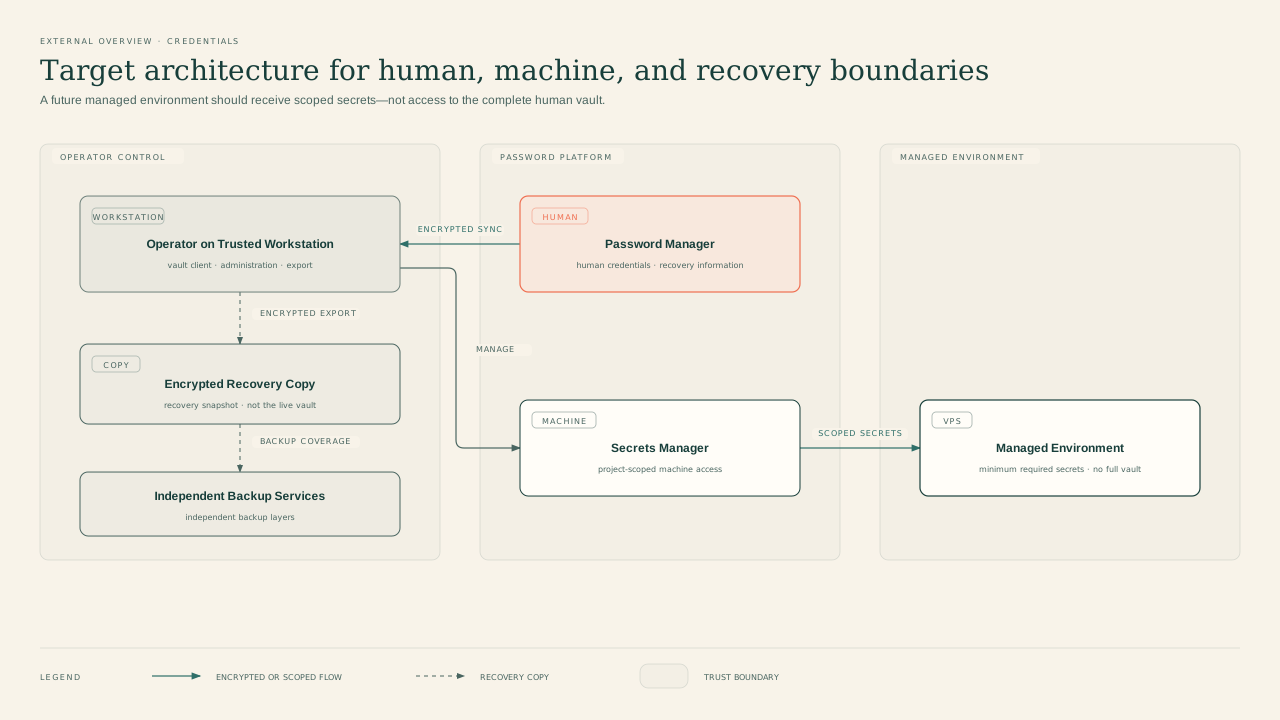
Diagram 2: target architecture keeps the verified human SSH identity separate from future machine secrets and recovery copies.
This build also clarified a distinction we want to preserve as the factory grows.
The SSH key described here belongs to a person. It is used interactively from a trusted workstation, with the Bitwarden desktop agent mediating requests and applying the vault’s authorisation behaviour.
Future agents and services will need non-human credentials. Those should not borrow the human SSH key or depend on an unlocked desktop vault. Bitwarden Secrets Manager models programmatic access through projects, machine accounts and access tokens. Its Secrets Manager overview describes that separate control plane, while its machine accounts guide explains how non-human identities can receive scoped project access.
The architectural rule is simple:
- Password Manager and its SSH agent handle the human administrator’s key.
- Secrets Manager (or another explicitly reviewed machine-secret system) handles future service and agent credentials.
- Neither boundary is a shortcut into the other.
That keeps the first step small without painting the later automation into a corner.
The recovery exercise surfaced three useful checks
The clean path emerged through three checks. An attempt to bootstrap access with ssh-copy-id exposed an assumption that does not fit an agent-only key: the tool initially looked for a private-key file beside the public selector, so the corrected procedure used the public-key-only mode. Existing identities were rejected after the rebuild, showing that the tested pre-existing identities did not authenticate. And the stale host pin stopped the first post-rebuild connection, proving that host verification was active.
Together, they narrowed uncertainty:
- no private-key file was required on the workstation;
- the Lab did not inherit access from another trust domain;
- the provider had installed the intended public key; and
- the client noticed that the rebuilt server had a new identity.
That is a better outcome than a frictionless login whose credential and host provenance are unclear.
A reusable secure-rebuild pattern
For another disposable Lab machine, the smallest useful sequence is:
1. Define the exact target and explicitly exclude stable environments. 2. Create one Ed25519 SSH identity for that trust domain. 3. Store the key as a Bitwarden Password Manager SSH-key item and enable deliberate authorisation behaviour. 4. Verify the Bitwarden agent socket and the expected public fingerprint without exposing private material. 5. Keep a local public-key selector, then configure the host alias, user, IdentitiesOnly, Bitwarden agent socket and a purpose-specific known-hosts file. 6. Inject only the public key through the provider’s authenticated rebuild or recovery workflow. 7. Let the old host pin fail. Verify the replacement host key through an independent channel before promoting it. 8. Complete any provider-mandated interactive password checkpoint without putting either password into logs or automation. 9. Open a fresh strict session and verify the non-secret remote account, target identity and intended sudo behaviour. 10. Update the architecture from the observed implementation, not from the design we hoped to build.
The provider interface may differ, and recovery conditions will differ. The invariant is that private credential material remains under its intended control plane while public material and verified identities cross boundaries deliberately.
What remains open
This experiment closes one access slice and exposes the next gates:
- prove Bitwarden account recovery, two-step-login recovery and encrypted backup restoration;
- decide whether to disable SSH password authentication, but only after the recovery path is proven;
- review and commit the workstation configuration without overwriting unrelated local changes;
- repeat the full rebuild on a second independent Lab target before calling the pattern adopted; and
- design non-human access separately rather than turning the human vault into an automation dependency.
These are not footnotes. A vault-backed key is only one control. Recovery, device trust, host verification, least privilege and repeatable acceptance evidence determine whether the overall route is resilient.
Step one, not the finish line
The first PatOS AI factory milestone is intentionally unglamorous and now live in the Lab: a person can rebuild the VPS, authenticate with a key whose private half remains in Bitwarden, detect the server identity change, and prove the resulting administrative path.
That gives later factory components something valuable to stand on: a known human control plane, a separate future machine boundary and a record of what was actually verified.
Next, the pattern needs an independent repeat and a tested recovery story. Only then should it graduate from a successful Lab rebuild into a reusable PatOS capability.